


Table of Contents
If your TikTok videos look cropped, blurry, or awkwardly framed, the issue often comes down to one thing: TikTok ratio size. Understanding the correct aspect ratio and video dimensions can dramatically improve how your content appears in the feed and how viewers engage with it.
In this complete guide, you’ll learn the ideal TikTok ratio size, recommended resolutions, file sizes, and practical editing tips to ensure your videos look sharp, professional, and optimised for reach in 2026.
What Is It?
TikTok ratio size refers to the aspect ratio of your video, which is the relationship between its width and height. Aspect ratio determines how your content fits on a viewer’s screen.
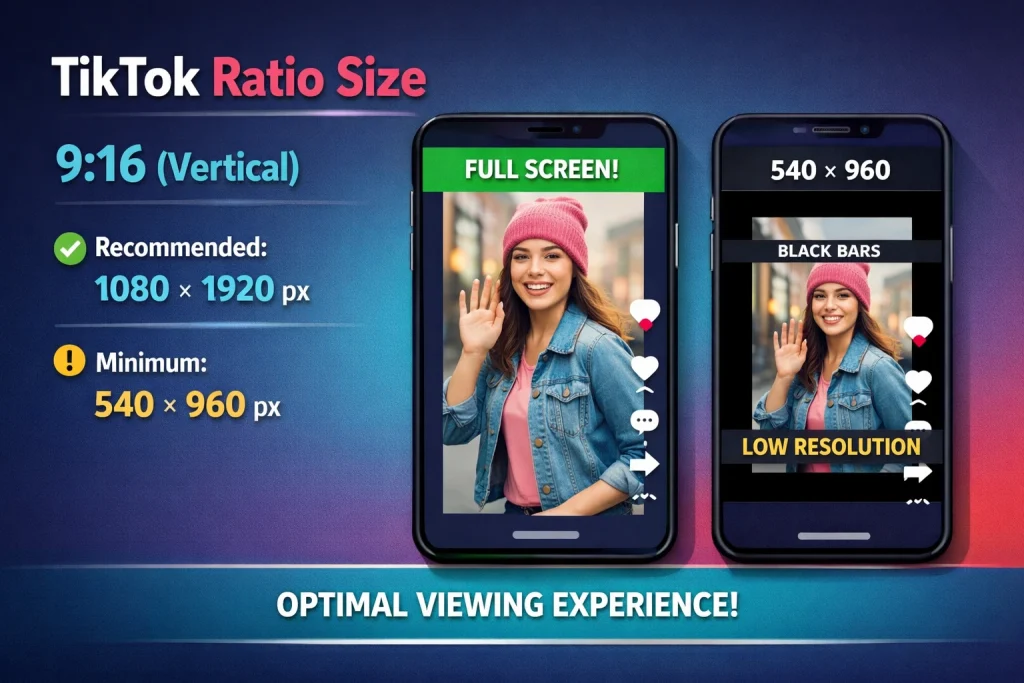
The recommended TikTok ratio size is:
- 9:16 (Vertical)
- Recommended resolution: 1080 × 1920 pixels
- Minimum resolution: 540 × 960 pixels
The 9:16 vertical format fills the entire mobile screen, creating a seamless viewing experience. Since TikTok is primarily a mobile-first platform, vertical video performs best in the For You feed.
Why 9:16 Is the Ideal Size
Choosing the correct TikTok ratio size has a direct impact on how your video looks and performs. The 9:16 vertical format remains the recommended standard for three main reasons.
Full-Screen Immersion
The 9:16 aspect ratio fills the entire smartphone screen from top to bottom. There are no black bars or awkward cropping, which makes the video feel clean and professional in the feed.
Because TikTok is built for vertical viewing, full-screen videos feel more natural and immersive. This seamless presentation helps keep viewers focused instead of distracted by unused screen space.
Better Engagement
Most users scroll TikTok while holding their phones upright. A 9:16 TikTok ratio size matches this behaviour perfectly, making your content easier and more comfortable to watch.
Vertical framing also makes faces, captions, and key visuals appear larger and clearer. When viewers can instantly see and understand your content, they are more likely to watch longer and interact.
Algorithm Optimisation
TikTok’s interface and feed are designed around vertical videos. Content uploaded in 9:16 fits smoothly into the platform without automatic cropping or resizing issues.
Since watch time and engagement influence distribution, using the correct TikTok ratio size supports stronger retention. Proper formatting creates a better viewing experience, which can positively impact performance.
Can You Use Other Aspect Ratios on TikTok?
While 9:16 is recommended, TikTok does allow other formats.
1:1 (Square Format)
The 1:1 square format, typically 1080 × 1080 pixels, is commonly used when repurposing content from Instagram or other social media platforms. It can work well for close-up shots, product showcases, or centred talking-head videos where the subject stays in the middle of the frame.
However, square videos do not fill the entire TikTok screen. This often results in black bars above and below the video, making the content look smaller compared to native vertical posts. While it is usable, it does not maximise screen space or immersion in the same way as the 9:16 TikTok ratio size.
16:9 (Ho rizontal Format)
The 16:9 horizontal format, usually 1920 × 1080 pixels, is standard for YouTube and traditional video platforms. On TikTok, though, horizontal videos appear reduced in size within the vertical feed unless viewers rotate their phones.
Because TikTok is designed for vertical scrolling, horizontal videos may feel less natural to watch. Important details can appear smaller, and the viewing experience may feel less engaging. For consistent performance and better visual impact, the 9:16 TikTok ratio size remains the strongest choice.

Source: Unsplash
Recommended TikTok Video Dimensions for This Year
Choosing the correct TikTok ratio size starts with understanding the recommended dimensions. For best results, use a vertical format with a resolution of 1080 × 1920 pixels and an aspect ratio of 9:16. This is the ideal setup because it fills the entire mobile screen and delivers the highest visual clarity.
If needed, TikTok also accepts a minimum vertical resolution of 540 × 960 pixels in the same 9:16 ratio. While acceptable, lower resolutions may appear less sharp, especially on larger screens. Square videos at 1080 × 1080 (1:1) can be used in certain cases, but they do not fully utilise screen space. Horizontal videos at 1920 × 1080 (16:9) are generally not recommended for standard feed content because they appear smaller within TikTok’s vertical layout.
File Size Limits
In addition to resolution and aspect ratio, file size matters. For regular uploads, iOS supports files up to 287.6 MB, while Android allows up to 72 MB. TikTok ads have a higher limit of 500 MB, giving more flexibility for branded campaigns.
TikTok supports common video formats such as MP4, MOV, MPEG, 3GP, and AVI. To maintain professional quality, recording in 1080p is strongly recommended whenever possible. Starting with high-resolution footage ensures your final video looks crisp after compression and upload.

Source: Unsplash
TikTok Ratio Size for Ads
If you’re running TikTok ads, the same 9:16 ratio remains the strongest choice.
TikTok Ad Specifications
When creating ads, following the correct TikTok ratio size is essential for performance. The recommended aspect ratio remains 9:16, with a resolution of 1080 × 1920 pixels. This ensures your ad fills the entire mobile screen, delivering a clean and immersive viewing experience.
TikTok allows ad file sizes of up to 500 MB, giving advertisers enough flexibility to maintain high visual quality. While video ads can run between 5 and 60 seconds, shorter formats often perform better. Many campaigns see stronger engagement within the 9–15 second range, where messaging is concise and visually compelling.
Short, well-paced ads formatted in the correct TikTok ratio size are more likely to capture attention quickly. When viewers can immediately see clear visuals in full-screen vertical format, it increases the chances of higher watch time, stronger engagement, and improved conversion rates.

Source: Unsplash
How to Set the Correct TikTok Ratio Size in Editing Software
Here are some things you can do to correct the ratio size:
Using Desktop Editing Software (Example Workflow)
- Create a new project or composition.
- Set dimensions to 1080 × 1920 pixels.
- Ensure the aspect ratio is 9:16.
- Adjust scale and positioning to avoid cropping key elements.
- Export as MP4 using H.264 codec.
- Set frame rate to 30fps.
- Use a bitrate between 5–10 Mbps for high quality.
Mobile Editing Apps
Most mobile video editors allow you to:
- Select 9:16 canvas
- Crop horizontal footage to vertical
- Add captions and overlays
- Export directly to TikTok
Always preview your video before uploading to confirm nothing important is cut off.
Safe Zones: Avoid Cropped Text and UI Overlap
Using the correct TikTok ratio size is important, but placement matters just as much. Even a perfectly sized 9:16 video can look unprofessional if text, logos, or key visuals are hidden behind TikTok’s interface elements.
To avoid this issue, keep important elements away from the top 150–250 pixels, where profile information and captions appear, and the bottom 250 pixels, where descriptions and engagement buttons are displayed. Position essential text, subtitles, and branding within the centre of the frame to ensure they remain visible across different devices and screen sizes.
Best Practices for Uploading High-Quality TikTok Videos
Creating great content is only part of the process. How you upload your video can also affect its final quality and performance.
1. Turn Off Data Saver
Before uploading, check your TikTok settings. Go to Settings and Privacy, select Data Saver, and ensure it is turned off. When enabled, this feature may compress your videos further, which can reduce clarity and sharpness.
2. Use a Stable Internet Connection
Upload your videos using a strong and stable Wi-Fi connection. Weak connections can sometimes trigger additional compression or reduce upload quality, affecting how your content appears in the feed.
3. Record in High Resolution
Start with the highest quality footage possible, ideally in 1080p. Upscaling low-resolution videos rarely restores lost detail, so recording clearly from the beginning makes a noticeable difference in the final result.
4. Capture Attention Immediately
While the correct TikTok ratio size improves presentation, strong content drives engagement. Aim to hook viewers within the first two to three seconds using movement, facial expressions, bold text, or a compelling opening line.
Common Mistakes to Avoid
Several small technical mistakes can reduce the impact of your content, even if you’re using the correct TikTok ratio size. Uploading horizontal videos without adjusting the frame can make your video appear smaller in the feed. Placing captions too close to the bottom may cause them to overlap with TikTok’s interface, while exporting in low resolution can result in blurry visuals. Ignoring file size limits or over-compressing videos before upload can further reduce quality. Even minor dimension or formatting errors can make your content look less polished and less professional.
Final Thoughts
Optimising your TikTok ratio size is one of the easiest ways to improve video quality and engagement. Stick with 9:16, use 1080 × 1920 resolution, export in MP4 (H.264), and keep your videos short and engaging. These basics ensure your content looks sharp and fully immersive on mobile screens.
Review your recent uploads and refine where needed. If you want professional support to elevate your TikTok content and ads, Pixie Digital Marketing Agency can help you build a strategy that drives real growth.