

Table of Contents
A Google Ads budget is the maximum amount an advertiser sets to spend on an ad campaign over a given period. The ideal budget is determined by your conversion targets, estimated cost per click, and business goals, not a number picked at random. This guide covers how to set the right Google Ads budget, the factors that influence it, and worked-out calculation examples.
1. What Is a Google Ads Budget?
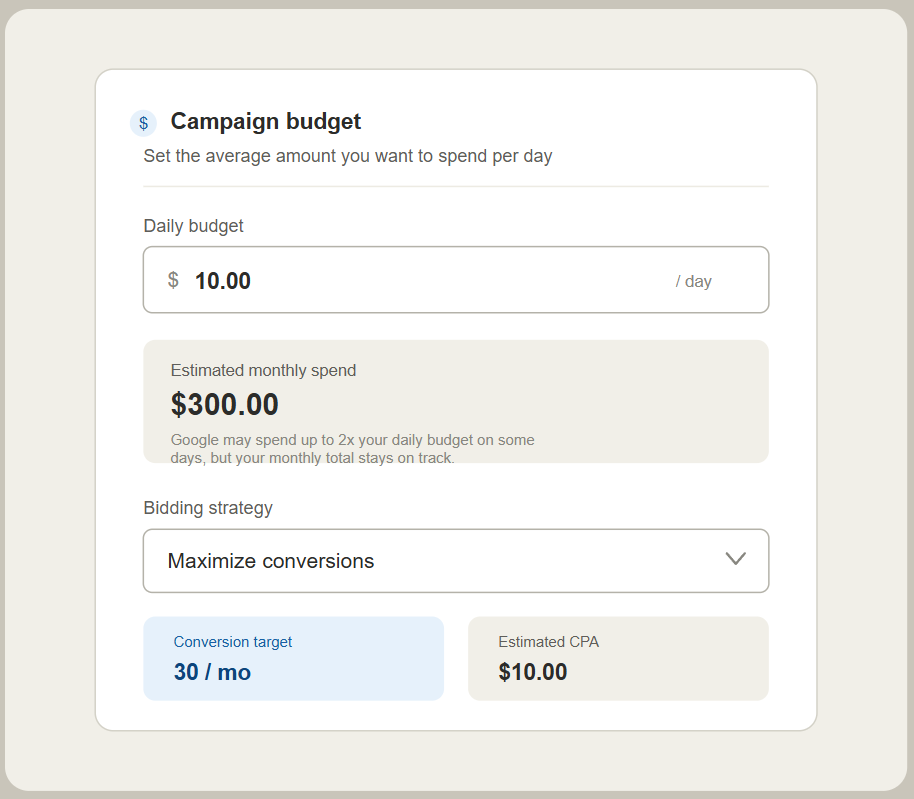
Illustration of the daily budget setup flow, bidding strategy, and conversion target in a Google Ads campaign.
Understanding Google Ads Budget
A Google Ads budget is the spending cap an advertiser sets for running a campaign in Google. It acts as the signal the Google system reads to decide how aggressively an ad competes in auctions, how often it’s shown, and to whom it’s prioritized.
Budget is different from bid. Budget is the total amount allocated, while bid is the price offered to win a single click or impression in the auction. The two affect each other: a high bid with a small budget will make the campaign run out of funds early in the day.
How Google's Daily Budget Works
Google Ads doesn’t spend your budget evenly throughout the day. On days with higher demand signals for example, when search traffic is busy, Google can spend up to twice your daily budget. On slower days, spend is pulled back below the daily budget.
This mechanism is called overdelivery, and it’s kept in check so that total spend over a calendar month doesn’t exceed (daily budget x the average number of days in a month, roughly 30.4). So even if one day looks “expensive,” the month as a whole stays under control.
2. What's the Ideal Google Ads Budget?
Factors That Determine Your Budget
There’s no single formula for the “ideal budget” because every business starts from a different place: product margin, average order value, sales cycle, and how competitive the industry is online. The ideal budget should be treated as the result of a calculation, not a number decided upfront based on gut feeling or matching a competitor.
A more accurate approach is to work backward from your business goals: how much revenue or how many leads you need, translated into how many conversions the ads must generate, and then the budget required to reach that.
Small Budget vs. Large Budget

A small budget carries a structural risk: Google’s algorithm needs volume — clicks and conversions to exit the learning phase and start optimizing delivery accurately. If the budget is too small for the chosen keywords, ads can keep losing auctions or only show during off-peak hours, leaving the data collected unrepresentative.
A large budget speeds up data collection and optimization, but has its own risk: without a clean campaign structure (keyword grouping, negative keywords, clear targeting), a large budget just burns through money faster without necessarily improving results.
The sweet spot: a budget large enough to generate at least 10–15 conversions per month per campaign, so smart bidding has enough data to learn — while still staying within what your cash flow can sustain.
3. How to Determine Your Google Ads Budget
Define Your Ad Goal
Each campaign goal has a different budget logic:
- Awareness: measured by impressions and reach, budget goes toward maximizing volume at an efficient CPM.
- Traffic: measured by clicks, budget is calculated as CPC x target clicks.
- Conversions (leads/sales): measured by CPA, budget is calculated as target conversions x CPA.
Using the same budgeting approach for all three goals is a common mistake.
Set a Conversion Target
Your conversion target should be realistic based on your business’s operational capacity to handle incoming leads, not just an ambitious number. If your sales team can only properly handle 20 quality leads per month, targeting 100 leads risks lowering follow-up quality and hurting your lead-to-sale conversion rate.
Estimate CPC and CPA
Use Google Keyword Planner to see the estimated CPC range for your keywords. To estimate CPA, combine CPC with an assumed conversion rate:
CPA = CPC ÷ Conversion Rate
Example: if the average CPC is $0.50 and your landing page’s conversion rate is estimated at 5%, then CPA = $0.50 ÷ 5% = $10. If you don’t have historical data yet, use a conservative assumption (2–3%) for a new landing page.
Set Your Daily Budget

Daily Budget = (Monthly Conversion Target x CPA) ÷ 30
This number is a starting point, not a final answer. After 2–4 weeks, compare it against your actual CPA and adjust.
4. Factors That Affect Your Google Ads Budget
Keyword Competition
The more advertisers targeting the same keyword, the higher the CPC due to the auction mechanism. Generic, high-volume keywords are far more expensive than specific long-tail keywords.
Target Audience and Location
Targeting an entire country requires a much larger budget than targeting a single city, because search volume and auction competition are far higher. For local businesses, narrowing your location actually makes the budget more efficient, since you’re only competing with advertisers in the same area.
Campaign Type
Search Ads generally have a higher CPC than Display Ads because they target users with active search intent. Shopping Ads have their own cost profile, influenced by product pricing and marketplace competition. Performance Max blends multiple channels at once, with budget distribution across channels handled automatically by the system.
Bidding Strategy
Manual CPC gives you full control over cost per click, suitable for campaigns with limited data. Smart bidding (Target CPA, Target ROAS, Maximize Conversions) needs enough historical conversion data, generally a minimum of 15–30 conversions in the last 30 days, for the algorithm to learn and work effectively.
5. Tips for Optimizing Your Google Ads Budget

Focus on Relevant Keywords
Prioritize high-intent keywords (containing words like “buy,” “price,” “near me”) over informational keywords that rarely lead to direct conversions.
Use Negative Keywords
Review your search terms report regularly, at least every two weeks, to find irrelevant search queries that are triggering clicks, and add them as negative keywords.
Monitor CPC, CPA, and Conversions
Don’t just look at total spend. Compare actual CPA against your target CPA regularly to see whether the budget is being used efficiently or needs a bidding strategy adjustment.
Allocate Budget to Your Best-Performing Campaigns
Use an 80/20 approach: allocate most of your budget to the campaign with the best CPA, and keep a smaller share for testing new keywords or audiences.
6. Example Google Ads Budget Calculations

Calculating Daily and Monthly Budget
A business is targeting 40 leads per month with an estimated CPA of $8.
Monthly Budget = 40 x $8 = $320 Daily Budget = $320 ÷ 30 = ~$10.70
A Simple Simulation Based on Conversion Target
After the campaign runs for 3 weeks, the actual CPA turns out to be $10 — higher than the initial estimate. There are two adjustment options:
Option 1: Raise the budget, keep the lead target: New Monthly Budget = 40 x $10 = $400
Option 2: Keep the budget, lower the lead target: New Lead Target = $320 ÷ $10 = 32 leads per month
Which option to choose depends on your cash flow capacity and how critical hitting that 40-lead number actually is.
7. Conclusion
An effective Google Ads budget isn’t a number decided unilaterally at the start, it’s the result of calculating your conversion target, estimated CPA, and financial capacity, then continuously adjusted based on real performance data. Regular evaluation matters far more than a “perfect” starting number.
Need help calculating and managing your Google Ads strategy so your budget runs more efficiently and delivers measurable results? The Pixie Digital team is ready to help. Visit pixiedigital.id for a consultation.